Project detail
Redesigning a Loan Origination System
Redesigned FinAGG’s internal Loan Origination System (LOS) to improve operational efficiency, workflow visibility, and navigation clarity for high-frequency fintech operations teams. Introduced a centralized dashboard, contextual case-level navigation, actionable LOS tracking, notifications, breadcrumbs, and workflow-driven information architecture to reduce cognitive load and improve decision-making speed. The redesign transformed a feature-heavy enterprise interface into a scalable operational system focused on clarity, continuity, and faster task execution.
Web Design (Dashboard)
3 Months
Fintech / Internal Operations
Impact Snapshot
Product & Operational Outcomes
Reduced operational navigation effort by an estimated 45–55%
Improved task discoverability and workflow visibility across operational teams
Reduced workflow confusion during case handling by introducing contextual navigation
Enabled teams to process applications with significantly lower cognitive overhead
Improved visibility into pending actionable LOS cases and operational bottlenecks
Established a scalable UX foundation for future fintech workflow modules
Background
At FinAGG Technologies, the Loan Origination System (LOS) acts as the operational backbone for processing and tracking loan applications across multiple lenders, programs, and internal teams.
The platform was heavily used by:
Credit Managers
Operations Teams
Relationship Managers
Verification Teams
The LOS handled:
Loan application tracking
Document verification
Case-level operations
Internal approvals
Workflow progression
Status management
When I joined the organization, I observed that although the system was functionally mature, the operational experience had become fragmented and mentally exhausting for users.
The issue wasn’t missing features.
The issue was:
The product had evolved operationally, but not experientially.
As workflows scaled, usability debt accumulated.
The Business Problem
The existing LOS interface created friction at multiple operational layers:
Users struggled to identify what required immediate action
Operational teams spent excessive time navigating workflows
Case progression lacked visibility
High-frequency users faced cognitive overload daily
Actions were discoverable, but workflows were not understandable
This directly impacted:
Operational efficiency
Turnaround time (TAT)
User confidence
Scalability of internal processes
Initial UX Audit & Observations
After auditing the platform and understanding operational workflows, I identified several core UX gaps.
1. No Operational Control Center
There was no dashboard experience.
Users entered the system without visibility into:
Pending work
Assigned applications
Case priorities
Workflow health
Operational load
This forced teams into reactive behavior instead of proactive decision-making.
2. High Navigation Dependency
The system had:
Deep operational nesting
Multiple modules
No navigation search
No contextual orientation
Users relied heavily on memory and repetitive navigation patterns.
3. Workflow Fragmentation
When a user selected a case, they were exposed to a dense horizontal action panel containing every possible operation.
This created:
High cognitive load
Slow action selection
Workflow interruption
Repeated re-navigation
The system optimized for feature access instead of operational flow.
4. Lack of Workflow Continuity
After completing an action, users had no guidance on:
What should happen next
Which stage was pending
Which operational task remained
This forced users to manually reconstruct workflow states.
5. No Real-Time Operational Nudges
Users were not proactively informed when:
New cases were assigned
Critical actions were pending
Operational priorities changed
This slowed response cycles across teams.
Product Goal
The redesign focused on one primary business objective:
Reduce operational friction while improving workflow visibility and decision speed.
From a product perspective, the goal was not just to modernize the interface.
The goal was to:
Reduce mental effort
Improve operational throughput
Create contextual workflows
Enable scalable fintech operations
Product Strategy
I approached the redesign using a workflow-first mindset.
Instead of asking:
“What actions should exist?”
I reframed the problem as:
“What does the user need to understand right now to move the workflow forward?”
This shift fundamentally changed the product architecture.
Major Product Improvements
1. Built a Centralized Operational Dashboard
Problem
Users lacked visibility into:
Pending applications
Current workload
Operational priorities
Workflow distribution
This increased task-switching friction and reduced operational awareness.
Solution
I introduced a centralized dashboard experience providing:
Application summaries
Pending LOS visibility
Status-oriented task tracking
Quick operational overview
Product Thinking
The dashboard was designed as:
An operational command center, not just a reporting layer.
This helped users quickly identify:
What requires action
What is delayed
What is already processed
Business Outcome
Improved workflow visibility across teams
Reduced dependency on manual status checking
Faster prioritization of pending cases
2. Added Navigation Search for Faster Discoverability
Problem
As operational modules increased, discoverability dropped significantly.
Users depended on memory to locate workflows.
Solution
I introduced a global navigation search allowing users to:
Instantly locate modules
Reduce navigation time
Access workflows faster
Business Outcome
Reduced navigation friction
Improved accessibility for high-frequency operational users
Lower onboarding complexity for new users
3. Introduced Breadcrumb Navigation
Problem
Users frequently lost contextual awareness in deeply nested workflows.
Solution
I added breadcrumb navigation to:
Improve orientation
Reduce navigation confusion
Provide workflow context at every depth level
Product Outcome
This significantly improved:
Context retention
Workflow continuity
User confidence while navigating complex operations
4. Added Notifications & Assignment Nudges
Problem
The system lacked proactive workflow communication.
Users were unaware when:
New cases were assigned
Tasks required attention
This created avoidable operational delays.
Solution
I introduced:
Notification system
Assignment nudges
Action alerts
Business Outcome
Improved operational responsiveness
Reduced delay in case pickups
Created more proactive workflow behavior
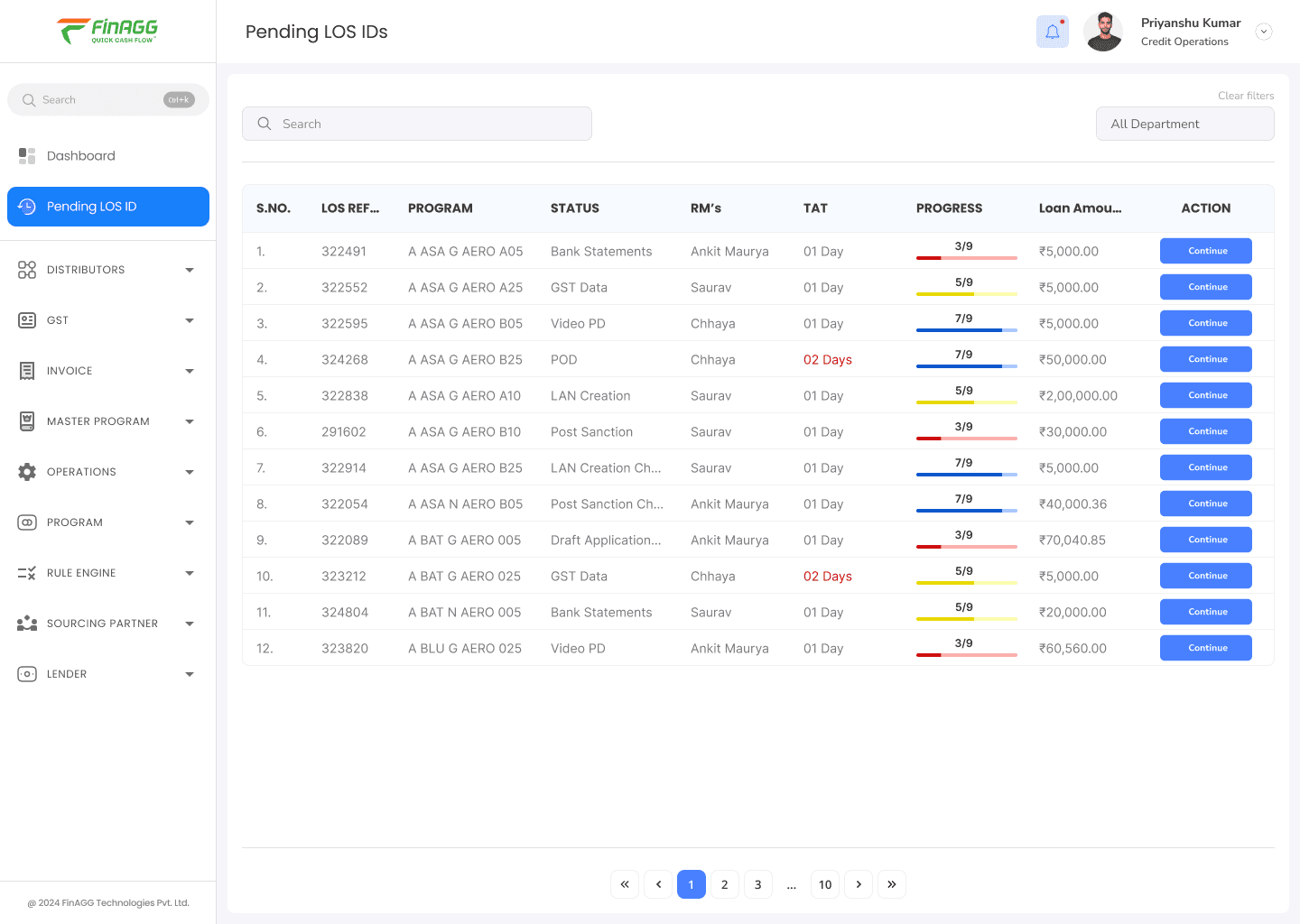
5. Designed “Pending Actionable LOS”
Problem
Users could not clearly identify:
Which LOS required action
Current workflow stage
Pending operational blockers
The system lacked workflow transparency.
Solution
I designed a “Pending LOS IDs” experience displaying:
Current stage
RM ownership
TAT tracking
Workflow progress
Loan amount
Action CTA
Product Thinking
Instead of displaying raw data tables, the system now communicated:
Operational state and urgency.
Business Outcome
Faster decision-making
Better operational prioritization
Increased workflow visibility across teams
6. Rebuilt the Case-Level Navigation System
Problem
Previously:
Users selected a case
Completed one action
Got lost again
The workflow forced repeated re-navigation and increased cognitive effort.
Solution
I redesigned the interaction model completely.
New Interaction Pattern
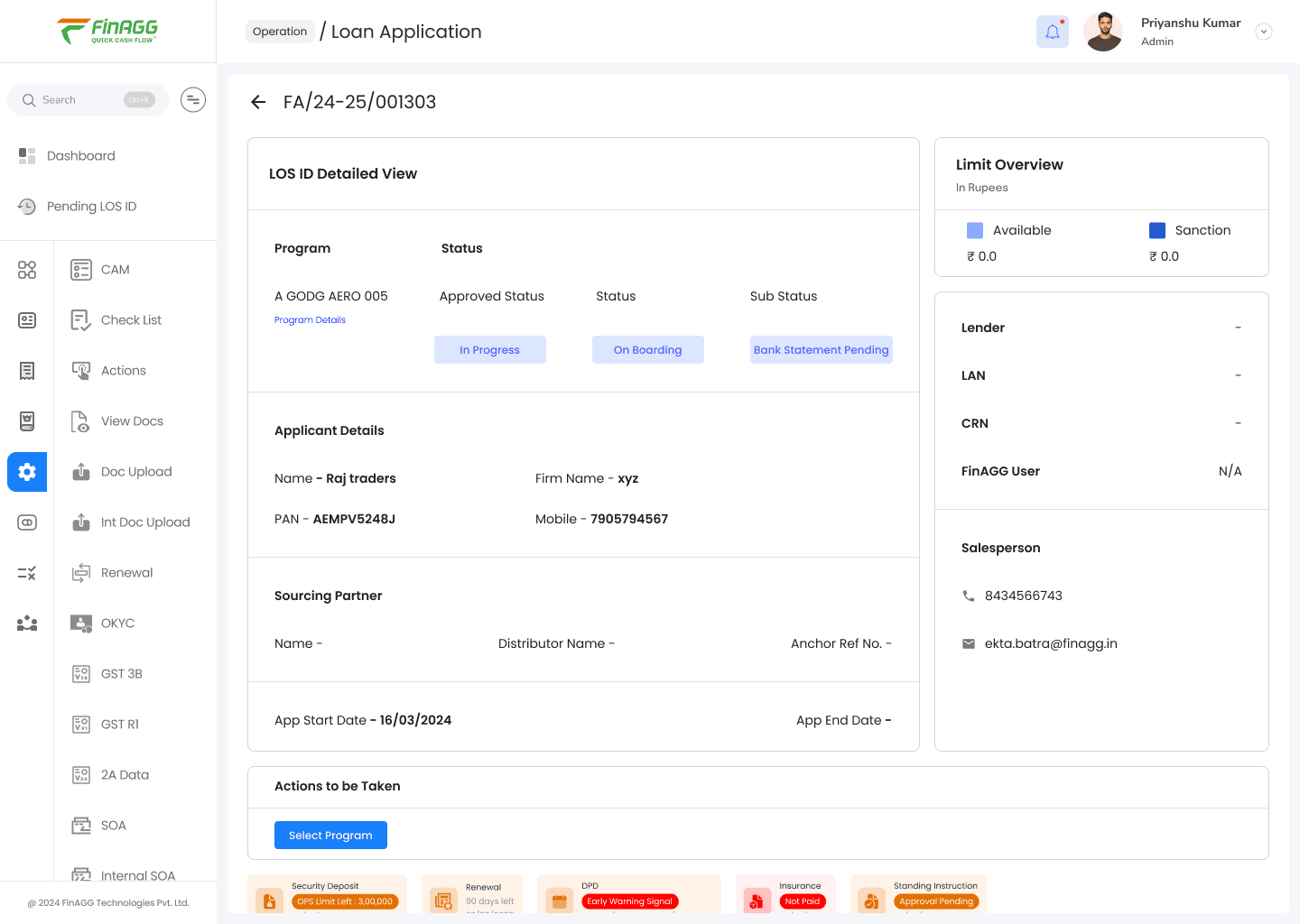
When a user enters a case:
The navigation dynamically transforms into case-level navigation
Relevant actions become persistent and contextual
Users can move across workflows without losing context
Product Thinking
This shifted the LOS from:
Action-based interaction
to:
Workflow-based interaction.
Estimated Operational Outcome
Reduced repeated navigation effort by ~50%
Faster movement between operational actions
Lower cognitive switching cost
7. Consolidated Case Intelligence into a Single View
Problem
Users previously needed to mentally piece together:
Status
Progress
Stakeholder information
Pending tasks
Workflow stage
This slowed operational execution.
Solution
The redesigned case view unified:
Application status
Progress indicators
Stakeholder information
Pending actions
Workflow state
Operational metadata
Product Outcome
Users could now understand the complete operational state of a case within seconds.
This significantly improved:
Decision speed
Workflow clarity
Context retention
Key Product Insight
One of the biggest realizations during this project was:
Legacy Enterprise Thinking
“Expose every possible action.”
Product-Led Thinking
“Reduce the number of decisions required to complete a workflow.”
This became the foundation of the redesign.
Business Impact
Although the redesign focused heavily on UX and operational flow, the larger impact was organizational.
The redesigned LOS helped create:
Better operational scalability
Faster workflow comprehension
Reduced training dependency
Improved action discoverability
Lower operational fatigue for high-frequency users
Most importantly:
The product evolved from a feature-heavy internal tool into a guided operational system.
What I Learned
1. Enterprise UX Directly Impacts Operational Efficiency
In high-frequency internal tools, poor UX compounds into:
slower operations
higher mental fatigue
lower throughput
Good UX becomes an operational multiplier.
2. Visibility Is a Product Feature
Users perform better when systems clearly communicate:
what matters
what is pending
what requires attention
Operational clarity is a business advantage.
3. Product Design Is About Reducing Complexity
The biggest UX wins didn’t come from adding features.
They came from:
reducing ambiguity
improving workflow continuity
making operational decisions easier
Reflection
This project fundamentally changed how I think about product design.
I stopped viewing design as:
Interface creation
And started viewing it as:
Designing systems that improve operational throughput and decision-making at scale.
The biggest lesson:
Great product design is not about making software look modern.
It’s about making complex systems feel operationally effortless.